pwd – print working directory
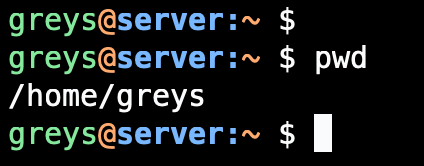
pwd prints the full path of your current working directory. Use it to confirm where you are in the filesystem.
Synopsis
pwd [OPTIONS]
Options
| Option | Description |
|---|---|
-L | Print logical path (follow symlinks, default) |
-P | Print physical path (resolve symlinks) |
Examples
Show current directory
$ pwd
/home/greys
Navigate and confirm
$ cd /var/log
$ pwd
/var/log
Logical vs physical path
When your current directory is accessed via a symlink:
$ ls -l /data
lrwxrwxrwx 1 root root 15 Jan 15 10:00 /data -> /mnt/storage

$ cd /data
$ pwd
/data

$ pwd -P
/mnt/storage
Use in scripts
#!/bin/bash
SCRIPT_DIR=$(pwd)
echo "Running from: $SCRIPT_DIR"
Save location for later
$ ORIGINAL_DIR=$(pwd)
$ cd /tmp
$ # ... do work ...
$ cd "$ORIGINAL_DIR"
PWD Environment Variable
The current directory is also stored in the $PWD variable:
$ echo $PWD
/home/greys

$ cd /etc
$ echo $PWD
/etc
Tips
- Prompt customization: Many shells show pwd in the prompt (e.g.,
\win bash) - Use $PWD in scripts: Faster than calling
pwdcommand - Combine with other commands:
ls $(pwd)orfind $(pwd) -name "*.txt"
See Also
Related Commands
- cd — Change directory
- ls — List directory contents
- dirname — Strip filename from path
- basename — Strip directory from path



